Once a homeowner decides they want backup power, the very next question is almost always the same: “Okay — how big does it need to be, and what system will best fit my needs and my budget?”
Both are fair questions, and the honest answer to the second one depends entirely on the first. So let’s do this in the right order. First I’ll show you exactly how to size a battery backup system for your house. This is the same load math I’d walk through at your kitchen table. Then I’ll lay out the real tradeoffs between a turnkey system like a FranklinWH or Tesla Powerwall and a custom-built component system. By the end you’ll know roughly what you need and which path fits you.
This whole exercise sits inside the world of battery backup without solar — we’re sizing to store grid power, not to generate your own.
Step 1: Decide what you actually want to keep running
This is the single most important decision, and it’s where the money is made or wasted. You do not have to back up your entire house. In fact, most people shouldn’t.
There are two philosophies:
Essentials-only (critical loads). You pick the circuits that truly matter — refrigerator, freezer, furnace blower, well pump, internet, a few lights and outlets — and back up just those. This is dramatically cheaper and makes even a single battery last a long time.
Whole-home backup. Everything stays on, including the big electric loads: central air conditioning, electric heat pump, electric water heater, EV charger. This is comfortable, but it requires more capacity and power, usually two or three batteries.
For most Rogue Valley outages, which last hours rather than days, essentials-only is the sweet spot. Let’s size that.
Step 2: Add up your running watts
Every appliance draws a certain number of watts while it’s running. Here’s a realistic essentials list for a typical Southern Oregon home. Your numbers will vary, but this gets you in the ballpark:
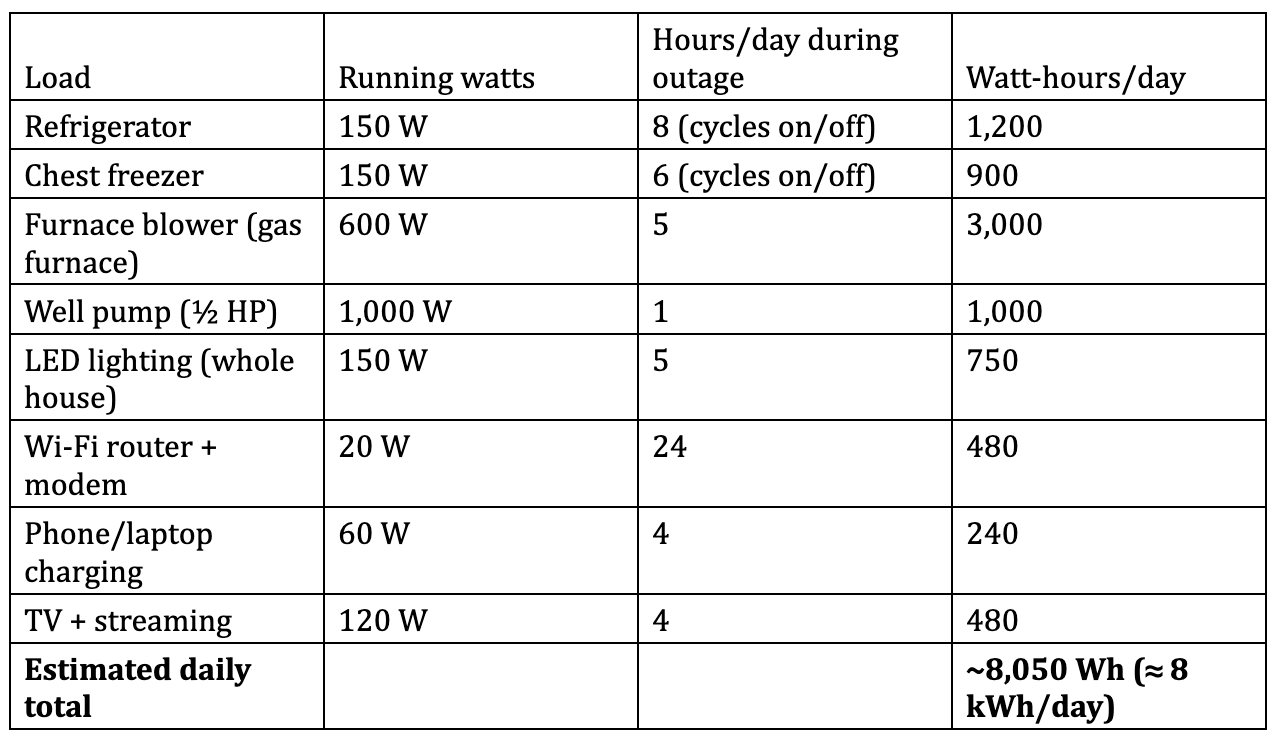
So this example home needs roughly 8 kWh per day to keep the essentials alive. That’s a useful anchor number.
Note what’s not on this list: no central AC, no electric heat, no water heater, no oven. The moment you add those, your daily total can triple or quadruple. That’s the difference between essentials and whole-home in one glance.
Step 3: Figure out how long you want to last
With a grid-charged system, “days of autonomy” works a little differently than with solar. Your battery only refills when the grid comes back, so you’re really sizing for the length of a typical outage, plus a margin.
If most of your outages are a few hours, one battery covering ~8 kWh of essentials is plenty.
If you want to comfortably ride out a full day without the grid, you want your storage at or above your daily essentials number: about 13–15 kWh of usable capacity (one FranklinWH aPower 2 or one Powerwall 3) covers that example home with room to spare.
If you’re preparing for a multi-day winter event and want essentials the whole time, you’re stacking two units.
Step 4: Check power (kW), not just capacity (kWh)
Here’s the mistake I see most often. People obsess over kWh (how long it runs) and forget kW (how much it can run at once). Both matter.
Add up everything that might run simultaneously at its peak. If your fridge, freezer, furnace blower, well pump, and some lights could all be on at the same moment, that’s real instantaneous demand — and it has to stay under your battery’s continuous power rating. A single Tesla Powerwall 3 (11.5 kW) or FranklinWH aPower 2 (10 kW) handles that essentials list easily. Try to add central AC and you may exceed it.
Step 5: Don’t forget surge
Motors, well pumps, AC compressors, refrigeration, and shop equipment will spike hard for a fraction of a second when they start. A ½ HP well pump that runs at 1,000 W can surge to 2,000–3,000 W at startup. Your battery has to swallow that surge without tripping. This is exactly why surge rating matters so much on rural Rogue Valley properties, and why the aPower 2’s 15 kW surge is such a useful spec and popular option for homes in Southern Oregon.
Step 6: Build in a usable-capacity buffer
Always size with a little headroom. Batteries are rated in usable kWh (the good systems already account for depth of discharge), but you still want margin for a colder-than-expected night, an appliance you forgot, or simple aging of the battery over years. Sizing right at your exact number leaves no cushion. I generally like to see 15–25% of breathing room.
Turnkey vs. custom: which path is right for you?
Now that you know roughly what size you need, here’s the build decision.
Turnkey systems (Tesla Powerwall 3, FranklinWH aPower 2)
A turnkey system is an integrated, engineered product: the battery, the inverter, and the control gateway are designed to work together, tested as a unit, UL-listed, and backed by a single manufacturer warranty.
Pros: Clean install, one warranty to call if anything goes wrong, excellent apps and monitoring, features like Tesla’s Storm Watch, and, important to note: permitting, and local inspectors and utilities are already very familiar with these systems. This means fewer surprises at inspection, and in general, faster time to get the system up and running.
Cons: You buy the capacity increments the manufacturer offers, and cost per kWh is higher than raw components.
Best for: The large majority of homeowners who want reliability, a clean warranty, and no drama.
Custom / component-built systems
A custom system is assembled from separate parts: a lithium (LiFePO4) battery bank, a separate inverter/charger, an automatic transfer switch, and custom wiring.
Pros: Potentially lower cost per kWh, and total flexibility. You can build an unusually large bank or a very specifc and custom tailored configuration.
Cons: This is where people get themselves in trouble. The warranty is fragmented across multiple manufacturers (when the inverter and the battery are made by different companies, and a failure can become a finger-pointing match). Permitting and inspections are harder because the inspector is looking at a one-off rather than a known listed product. And a battery system is not a weekend DIY project - you’re dealing with high-voltage DC, code requirements, and real fire-safety considerations if it’s done wrong.
Best for: Custom solutions, off-grid-style setups, and homeowners working with an experienced installer who can properly engineer and permit the build.
A quick word on doing it yourself
I’ll be direct, because it’s a safety issue: a large home battery bank is not the same as wiring an outlet. Improper battery installation is a genuine fire and shock hazard, it can void insurance, and an un-permitted system can create problems when you sell the house. If you’re handy and want to build a small system, understand exactly what you’re taking on. For a whole-home system tied into your panel, this belongs in the hands of a licensed electrician, both for your safety, and to keep everything code-compliant and insurable.
Putting it together
For the example home above: ~8 kWh of daily essentials, a well pump needing surge headroom, and a desire to ride out a full-day outage points cleanly to one turnkey battery in the 13–15 kWh class: either a single Tesla Powerwall 3 or FranklinWH aPower 2. These will always provide you with the option to add a second unit later if you decide you want the AC on too! Once you know your number, you can also work out what a 10kWh battery backup can realistically run and whether that’s enough for your loads.
Here’s where I’ll put our cards on the table: we’re a certified installer for both FranklinWH and Tesla Powerwall, which means we can size and build either one to code, handle the permitting cleanly, and stand behind the warranty, as opposed to steering you toward whatever one brand we happen to sell. These options are also very well set up for adding solar in the future.
The truth remains that every electrical panel, well pump, and appliance configuration is different, so your real sizing number can’t be nailed down from a worksheet alone. The best way to get it exactly right is to have someone measure your actual loads. If you’d like a precise system size and a real quote, book a free on-site assessment and we’ll do the load math with you — no pressure, just straight numbers from a licensed local expert.